1. 표 생성 사이트
https://www.tablesgenerator.com/markdown_tables
Markdown Tables generator - TablesGenerator.com
You can import table data by uploading file in CSV format (Comma Separated Value). Most spreadsheet software, both desktop and online, allows to save tabular data in CSV format — it is usually available in the File menu under the name "Save As..." or "Ex
www.tablesgenerator.com
2. 목차 생성 사이트
https://ecotrust-canada.github.io/markdown-toc/
Generate TOC Table of Contents from GitHub Markdown or Wiki Online
This page uses markdown-toc library to generate your MarkDown TOC online. paste markdown here # Paste Your Document In Here ## And a table of contents will be generated ## On the right side of this page. TOC generated here
ecotrust-canada.github.io
3. Github 마크다운에 이미지 올리기
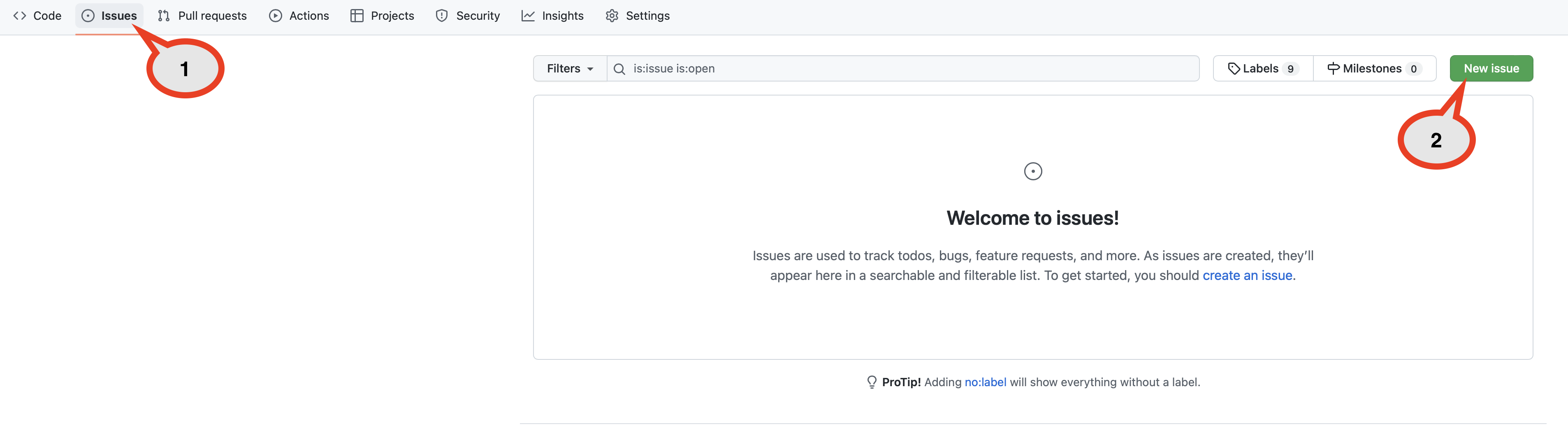
1. Issues 클릭
2. New Issue 클릭

3. Write 칸에 이미지 드래그
4. 나온 주소 모두 복사 붙여넣기
'도움되는 사이트들' 카테고리의 다른 글
| [도움되는 사이트들] 키워드 사이트 (0) | 2022.07.10 |
|---|---|
| [도움되는 사이트들] 오디오 편집 사이트 (0) | 2022.07.06 |
| [도움되는 사이트] JSON API 연습 사이트 (0) | 2022.07.01 |
| [도움되는 사이트] 이미지 편집 툴 사이트 (0) | 2022.06.30 |
| [도움되는 사이트들] 앱 이미지 사이즈 제작 사이트 (0) | 2022.06.27 |